Four days, six tracks, and a venue that still looks like the transformer factory it used to be, right down to the main room being called the Trafohall. The Workplace Ninja Summit in Baden has grown into the place where the European endpoint management community actually talks to each other, and 2026 was no exception.
The part that will not fit into any set of session notes: I had a blast. For four days my social media feed was walking around as actual people, names I have been reading for years turning into conversations over coffee and beer, and those hallway conversations were worth as much as anything on stage.
What follows is not a complete conference report. It is the set of things that were new to me, that changed my mind about something, or that I wanted to write down before I forgot them. Sessions I attended that mostly confirmed what we already do get a short mention or none at all.
Table of Contents
- Three threads running through the week
- Day 1, Monday
- Day 2, Tuesday
- Day 3, Wednesday
- AI Didn’t Create the Gap. It Ended the Grace Period.
- Cybersecurity: from Disabler to Enabler
- Modern Windows Security Bypassed
- IT disaster bootcamp
- Inside the Intune Management Extension: Why Applications Fail to Install
- Windows Autopilot Unlocked: Tips, Tricks, and Real-World Optimisation
- Ninja Tips & Tricks, Beer Session
- Day 4, Thursday
- What I am taking back to the office
Three threads running through the week
Before the session notes, the patterns I noticed.
AI stopped being a track and became the substrate. Last year AI was something you went to a session about. This year it was in the keynote, in the deployment tooling, in the packaging tools, and in the security sessions, usually without anybody announcing it. The sharpest framing came from the day one keynote: our job is moving away from configuring settings, profiles and scripts ourselves, and toward verifying what an agent did on our behalf. That is a different skill, and most of us have not built it yet.
Security keeps turning out to be a communication problem. Two separate Sami Laiho sessions and a keynote landed on the same point from different directions. The technical controls are mostly known and mostly available. What fails is the framing. “You can’t fix your computer” versus “nobody can break your computer” is the same policy described twice, and only one of them survives contact with the business.
Deployment tooling is having a second wind. OSDCloud, the new MSEndpointMgr Cloud Imaging project, Microsoft’s own Cloud Rebuild, and a very healthy amount of community PowerShell. For a problem that was supposed to be solved by “just use Autopilot”, bare metal and recovery imaging are getting a surprising amount of attention, and the answers are getting better. Several speakers made the point independently, Jörgen Nilsson most directly: how you deploy Windows bare metal is still one of the important questions in any Intune and Autopilot project, and a project that has not answered it has not finished.
What it really comes down to is choosing your own poison, and the choice is how much control you want to trade away for how little work. At one end, the newest bits and almost no control: OSDCloud gets you a current image with very little ceremony, and Microsoft’s own Cloud Rebuild, which pulls image and drivers straight from Windows Update, is chasing the same idea from some way behind. In the middle, you own the environment and the tasks that run in it, which is where the MSEndpointMgr Cloud Imaging project sits. At the other end, full task sequences with DeployR or Configuration Manager, where nothing happens that you did not write down first. None of these is the right answer. They are just different bills for the same meal.
Day 1, Monday
Rethinking the Endpoint: The Forces Reshaping How We Manage and Secure Work
Venkata Pampana, Peter Thompson, Eugenie Burrage
The opening keynote set the tone described above: control gives way to verification. The line I keep coming back to is that the endpoint is the boundary between AI and people. Everything an agent wants to do to a user eventually lands on a device we manage, which makes the endpoint the place where AI governance stops being theoretical.
On the concrete side: agent MSX packaged as MSIX arrives in September 2026, and AI agent policies are coming to the management stack.
Houston, We Have a Migration: Migrating Apple Devices across MDMs
Somesh Pathak
An honest session about a migration nobody enjoys. The details that matter if you are planning one:
- Set a deadline per migration ring rather than a single cutoff.
- iOS forces a restart, macOS does not.
- App preservation is iOS only. On macOS, apps stay installed but come out unmanaged on the other side.
- You need a separate VPP token for the target MDM.
- The 30 day ABM removal window blocks migration, so wait out those 30 days before handing devices to users.
Somesh has a migration tool on GitHub and posts on intuneirl, both worth a look before you start scripting this yourself. He also showed an MDM Migration Cockpit in the tips session later in the week, covered further down.
Intune Architecture Explained: Behind Windows Device Management
Rudy Ooms, Joost Gelijsteen
The takeaway I did not have before: your tenant lives in an Azure Scale Unit, and knowing which one changes how you troubleshoot. If you see the same problem in two tenants, the first question is whether they share an ASU or just a region. Updates roll out per region (Asia, Europe, US), so “is this us, our ASU, or the whole region” becomes a real triage step rather than a shrug.
The Intune ASU Finder tells you where a tenant sits.
The rest of the session was a tour of how many separate services are involved in a single sync, and how differently each of them behaves. One slide made the point better than any explanation:
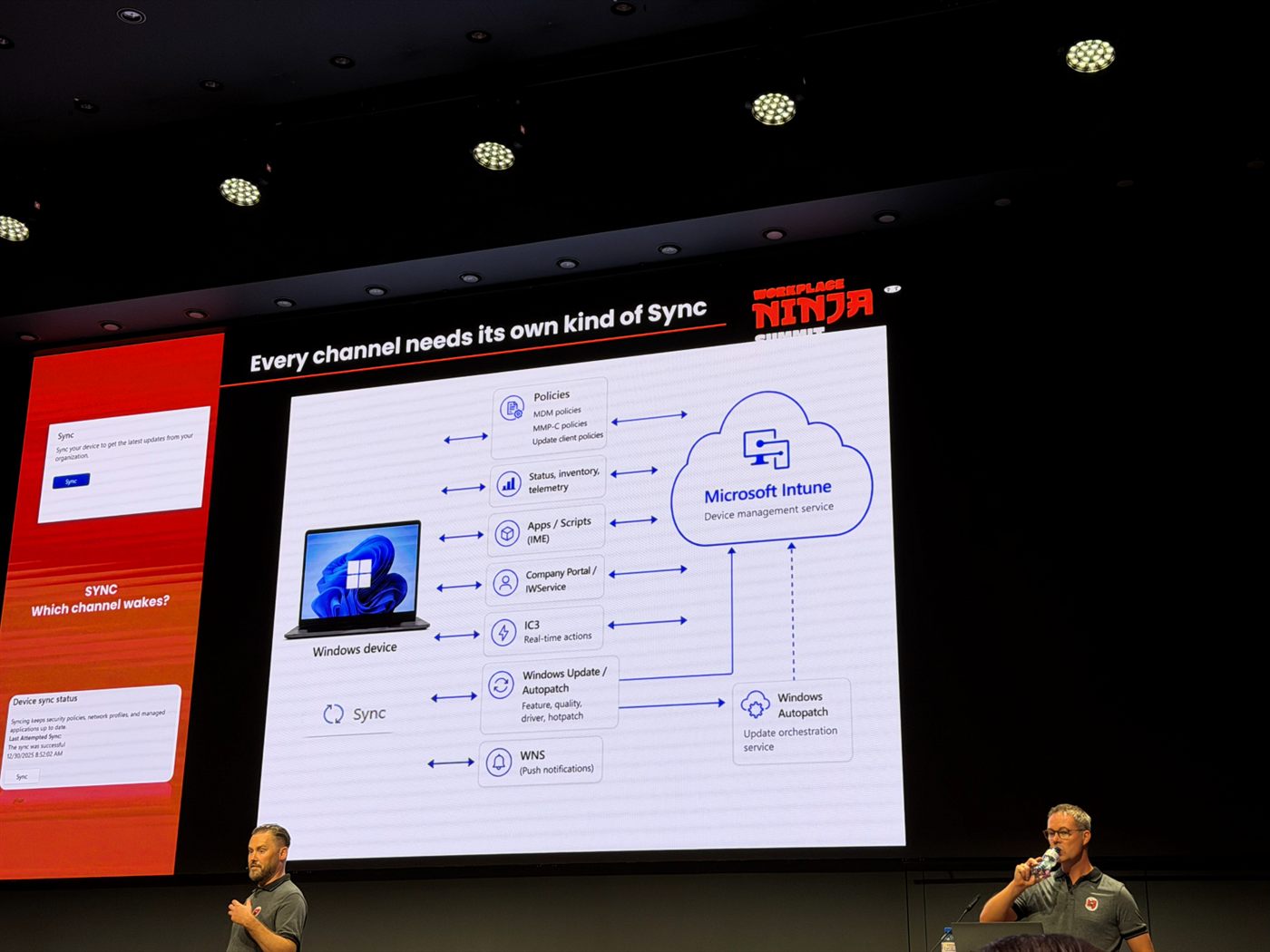
Seven channels between one device and one service, each with its own behaviour: MDM, MMP-C and update client policies; status, inventory and telemetry; apps and scripts through the IME; Company Portal and IWService; IC3 for real-time actions; Windows Update and Autopatch for feature, quality, driver and hotpatch updates; and WNS for push notifications. The question the slide asks is the useful one: when you hit Sync, which channel actually wakes?
That reframes “it didn’t apply” as a question about which channel was involved, which is a much more answerable one. It also explains why IC3 and WNS kept coming up later in the week.
New OSDeploy Tools
David Segura, Harm Veenstra
OSDCloud news, and good news. OA3Tool is now included in OSDCloud by Recast, the WinPEStartup Profile Agent is an AI agent skill that builds new OSDCloud profiles for you, and Recast stated clearly that it will be and will stay free for the community. v1 continues to get updates, including the driver logic.
David also gave the number that explains the whole approach: around 1.5 million deployments run on OSDCloud v1 every year. That is not a codebase you get to break. Features from v2 will make their way into v1, but carefully and on his terms, and after hearing the number I would not want it any other way.
Cloud Windows Imaging Revolution: What’s next
Nickolaj Andersen, Mattias Melkersen
MSEndpointMgr’s CloudImaging is the other half of this story. You deploy it into your own Azure environment and get a solution for building boot images and deploying clients. Compared to OSDCloud you get more control and, correspondingly, more responsibility. v1 is out, and a lot is still on the roadmap, including integration of the driver automation tool.
Day 2, Tuesday
Beyond Deployment: Sustaining Windows 11 Excellence
Johan Arwidmark, Andrew Johnson
The detail that made the room laugh and then think: Microsoft spent twelve months trying to build a stable process for converting hybrid joined clients to cloud only, and did not get there.
Third party tools will do the conversion, but it is still not the recommended way to get to cloud only. An AD joined device carries too much that you cannot account for, GPOs being the obvious example, and you can never be confident you have actually removed all of it. Reinstall remains the honest answer.
Practical note: when you deploy feature updates through servicing or Autopatch, SetupConfig.ini still gives you control over things like pre and post scripts. The MSEndpointMgr write-up is older but still the reference.
Surviving Microsoft Security at Scale: An MSP’s Guide to Intune, Entra and Defender
Maurice Daly, Lewis Barry
The framing question: as an MSP, do you still need an RMM?
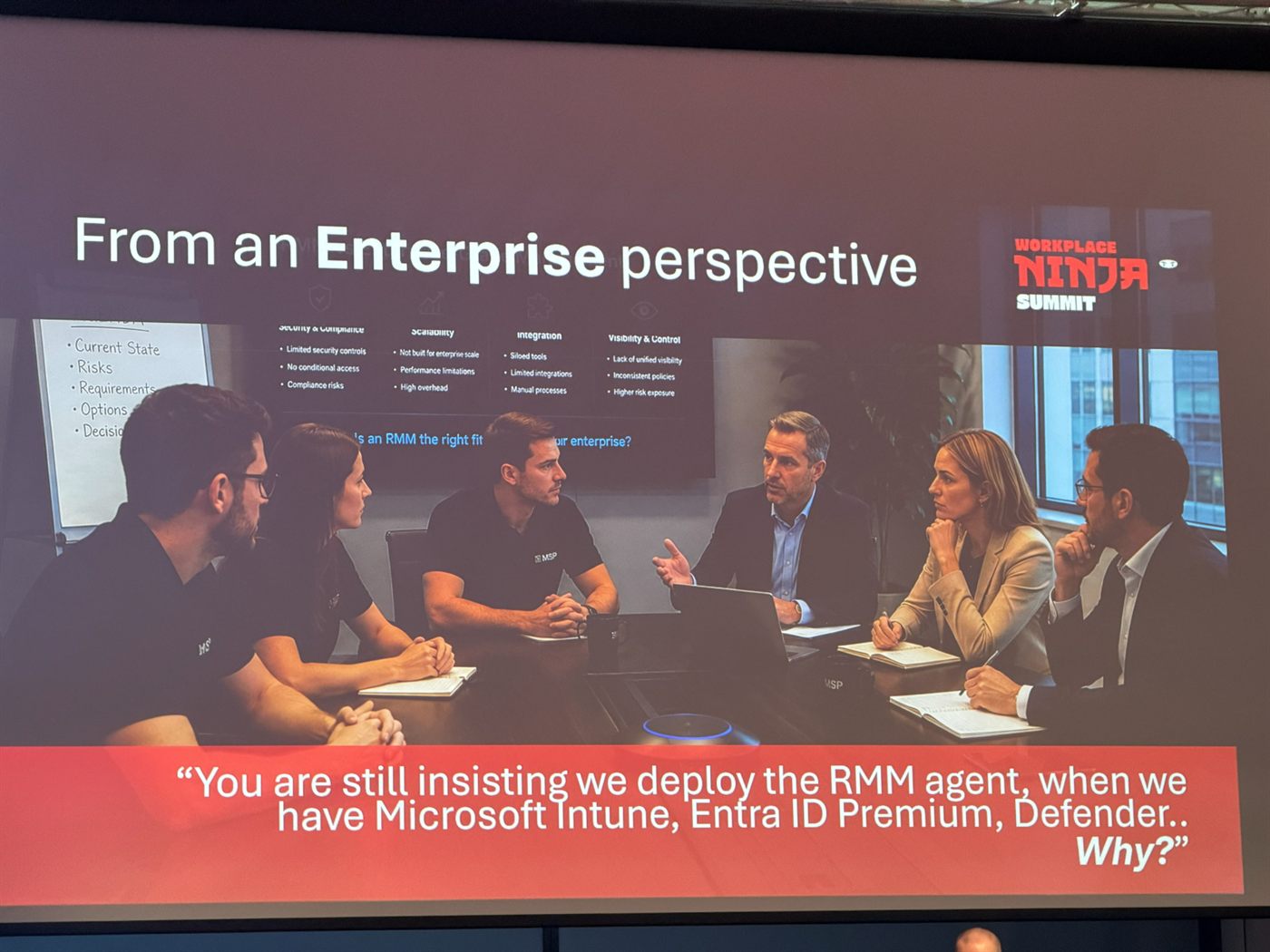
The slide that framed the whole session. The enterprise objections listed behind it: limited security controls, no conditional access, compliance risks, not built for enterprise scale, siloed tools, inconsistent policies.
The argument against it is stronger than I expected. Maurice told a story from a company he worked for that had just taken on a new MSP. Before letting the RMM agent loose in their environment he wanted to understand what it actually did, which is exactly the diligence you would hope for. The access the MSP had granted them turned out to let him manage devices belonging to that MSP’s other customers.
A system level agent from your MSP on every machine is a standing liability, and in a management landscape that already has Intune, the risk increasingly outweighs the convenience. For the MSP, it is also a liability question, not just a security one.
Also noted on the licensing side: per Microsoft, user 301 and beyond past Business Premium needs E5, since Purview is already included in BP.
Every Device Is a Security Boundary: Secure It by Design
Morten Knudsen, Sergey Chubarov
The idea I took away is defining personas for every user and device and tagging them, using Entra device extension attributes as the tag carrier. It is elegant, and it raises a governance question I have not answered yet: who is allowed to write those attributes? A tag that drives policy is only as trustworthy as the delegation around it.
Morten’s Entra Policy Suite implements the approach.
11 Ways to Hack Windows 11
Sami Laiho
The reframing that stuck: BitLocker is an integrity control, not a data confidentiality control. What it actually buys you is protection against offline tampering with the OS, the classic copy cmd.exe over sethc.exe attack. Everything else follows from that.
Which leads to the pairing: BitLocker and least privilege are not alternatives, you need both. Without BitLocker anyone can get admin, and with admin, anyone can disable BitLocker. Neither control is complete on its own.
The line that landed hardest, because it is obvious the moment somebody says it out loud: an OEM installation is a compromised device. You did not build it, you cannot account for what is in it, and other people held admin on it before you ever powered it on. Every integrity guarantee you are about to rely on is being measured against a baseline that was never yours. Wiping it and installing your own image is not paranoia, it is the first moment the chain of custody actually belongs to you. Which is the deployment thread arriving from the other direction: the bare metal question is not just an operational preference, it is where the security story starts.
Two operational items. In Entra, turn on Restrict users from recovering the BitLocker key(s) for their owned devices, which lives in Device settings and stops users self-servicing the recovery keys for hardware they own. And in AD, set Configure registry policy processing to reapply GPOs even when the objects have not changed, so a locally reverted setting gets put back.
The Art of Killing Local Admin
Simon Skotheimsvik
A genuinely good session on handling admin accounts, and for us mostly a confirmation. For cloud only, remove local admins except LAPS and possibly device administrators managed through Intune, and use EPM for the edge cases rather than as the general answer: developers, applications that insist on updating themselves, the handful of jobs that genuinely need elevation. Not much new for me, which is its own kind of useful feedback.
Hilarious History of Windows
Sami Laiho
The end-of-day session, and worth staying for. Best fact: AFD originally stood for “another f***ing driver”, because nobody had time to come up with a real name. The current expansion, “Ancillary Function Driver for WinSock”, was retrofitted onto the same acronym later.
Also: Windows 2000 gave us plug and pray. :D
Day 3, Wednesday
AI Didn’t Create the Gap. It Ended the Grace Period.
Lior Bela, Paul Snow
Strong title, strong keynote, and some genuinely committed WordArt.
The substance: everyone is learning AI on the go. Not just customers and consumers, but Microsoft and the model providers too. Nobody in this chain has the settled answer yet, and pretending otherwise is the actual risk.
The structural point: security has to reorganize around AI agents rather than staying in the old silos of network, security and endpoint. Agents do not respect those boundaries, so an org chart built on them will keep producing gaps.
The demo that made the argument concrete was codename MDASH, an agentic code scanner inside Microsoft Defender, currently in preview. Instead of pattern matching, it runs a multistage pipeline: rank files by risk using call graph analysis, then turn more than a hundred specialized agents loose on them (an injection auditor, a memory safety auditor, an auth bypass auditor and so on), then validate with taint analysis and a multi-model debate to strip out the false positives. Findings land in Security Exposure Management with a confidence score, and defender fix in the Defender CLI generates the patch. It connects to GitHub and Azure DevOps and runs on demand or in CI/CD.
Whether it holds up in practice is another question, but as an illustration of the keynote’s point it works: this is not security tooling with AI bolted on, it is a security tool that only exists because agents can now argue with each other about whether a finding is real.
Cybersecurity: from Disabler to Enabler
Sami Laiho
My favorite session of the week. The thesis: security is a support function, not THE function. If security is the department that says no, you get #naas, No as a Service, and the business simply routes around you.
The best operational reframe: your job is not to stop the attacker, and you have no way of knowing what they will try anyway. It is to slow them down and make the easy routes expensive, so that whatever they end up resorting to is strange enough for your SOC to notice. Make your enemy an anomaly.
And the least privilege argument in one line: “I can’t fix my computer” versus “nobody can break your computer”. Same control, different sentence, very different reception.
Communication is the most important part of any security measure, and it should be delivered in a positive tone. Obvious once said, rarely done.
Modern Windows Security Bypassed
Sergey Chubarov, Morten Knudsen
The most technically dense session I attended, and the one that sent me back to check our own configuration.
The premise matters, so state it first: every demo assumed the attacker already has admin access on a workstation. Nothing here is about getting in. It is all about what your defences are still worth once somebody is already there with elevated rights, which is exactly the scenario most of us quietly assume will not happen. A selection:
- Blocking EDR from the cloud with a firewall rule. Block the services, any IP. The mitigation is to block local merge of firewall rules.
- Vulnerable signed kernel drivers are still very much a thing. The Zemana driver, signed before 1607, can be used to kill the EDR client. RTCore64.sys is another example.
- Defending against that means ASR, HVCI, the vulnerable driver blocklist and driver signature enforcement, together rather than individually.
- ASR rules ship with undocumented default exclusions. If PsExec was already present before the rule was enabled, the rule will allow it to run. Every rule has these, and you can find them by searching the rule GUID in the LUA files. Sergey published his material at github.com/Schubarov/wpninja2026.
- Credential Guard can be disabled via WinDbg. The defense is restricting debug access.
- Sysmon can be neutered by blocking the driver start in the registry or blocking its communication in the firewall. Mitigations: protect the configuration, and keep evidence off-host.
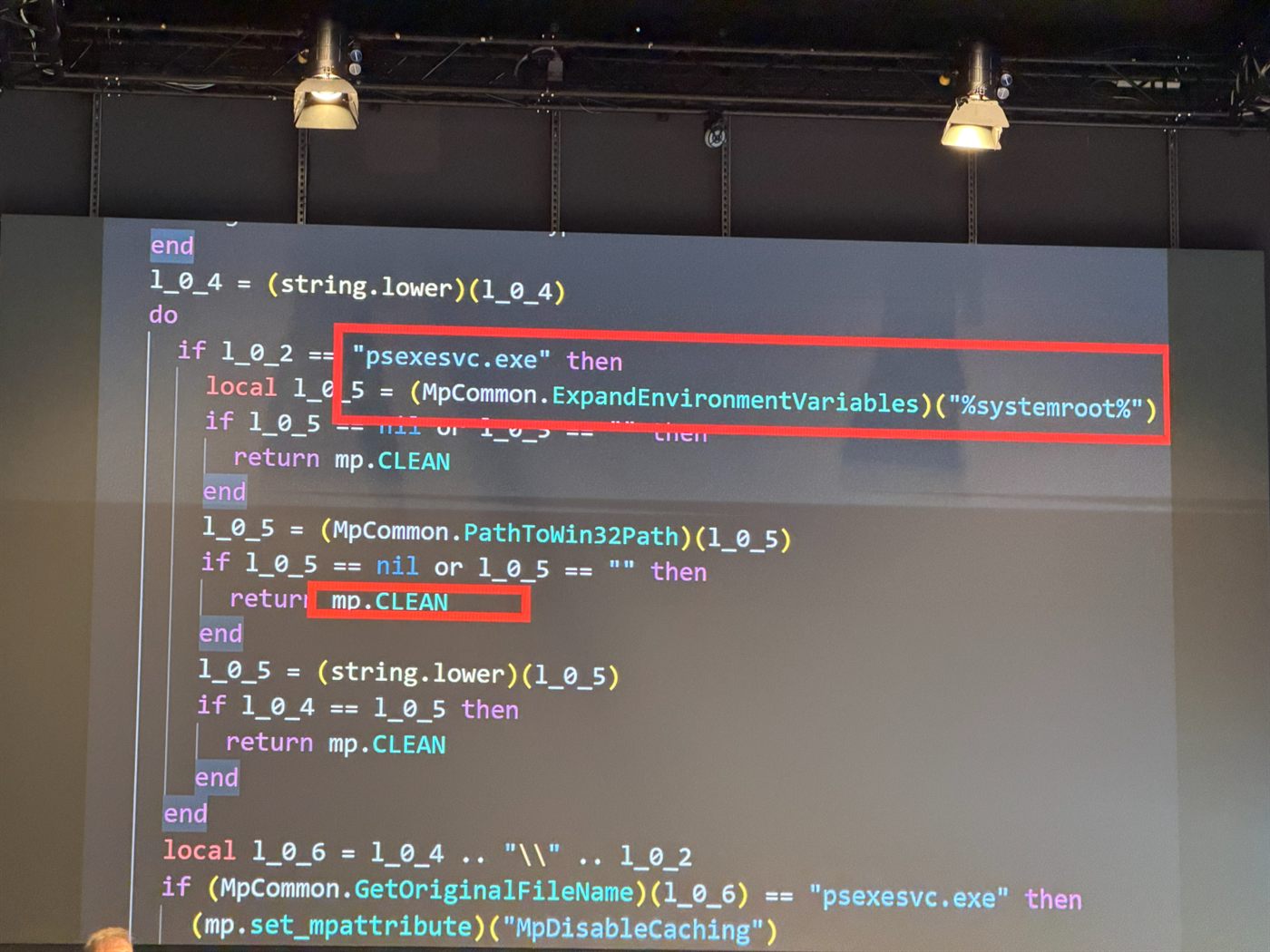
An ASR default exclusion in the raw. If the binary resolves to psexesvc.exe under %systemroot%, the rule returns mp.CLEAN and lets it through. None of this is in the documentation.
The theme across all of it: none of these are exotic exploits. They are supported features working exactly as designed, pointed the wrong way. Which is why the answer is almost never a patch. It is not handing out the admin rights that make any of it possible, which is what the two local admin sessions had already been arguing.
IT disaster bootcamp
Andreas Hammarskjöld, Mikael Nystrom
Sobering, and the most quotable numbers of the week.
- Your disaster plan must be one page and readable in under two minutes. If it is a binder, it does not exist.
- Only about 40% of backups actually work during an incident.
- OT is its own problem: XP and other legacy operating systems that nobody can patch and nobody can turn off.
- Plan for needing a different datacenter entirely, for a natural disaster or a war, not just a different rack.
- After a ransomware event, budget a week before you can even start reinstalling machines.
That last one is the number I will be quoting in planning meetings.
The most immediately usable slides were the two on first actions for endpoints after a breach. Print them.
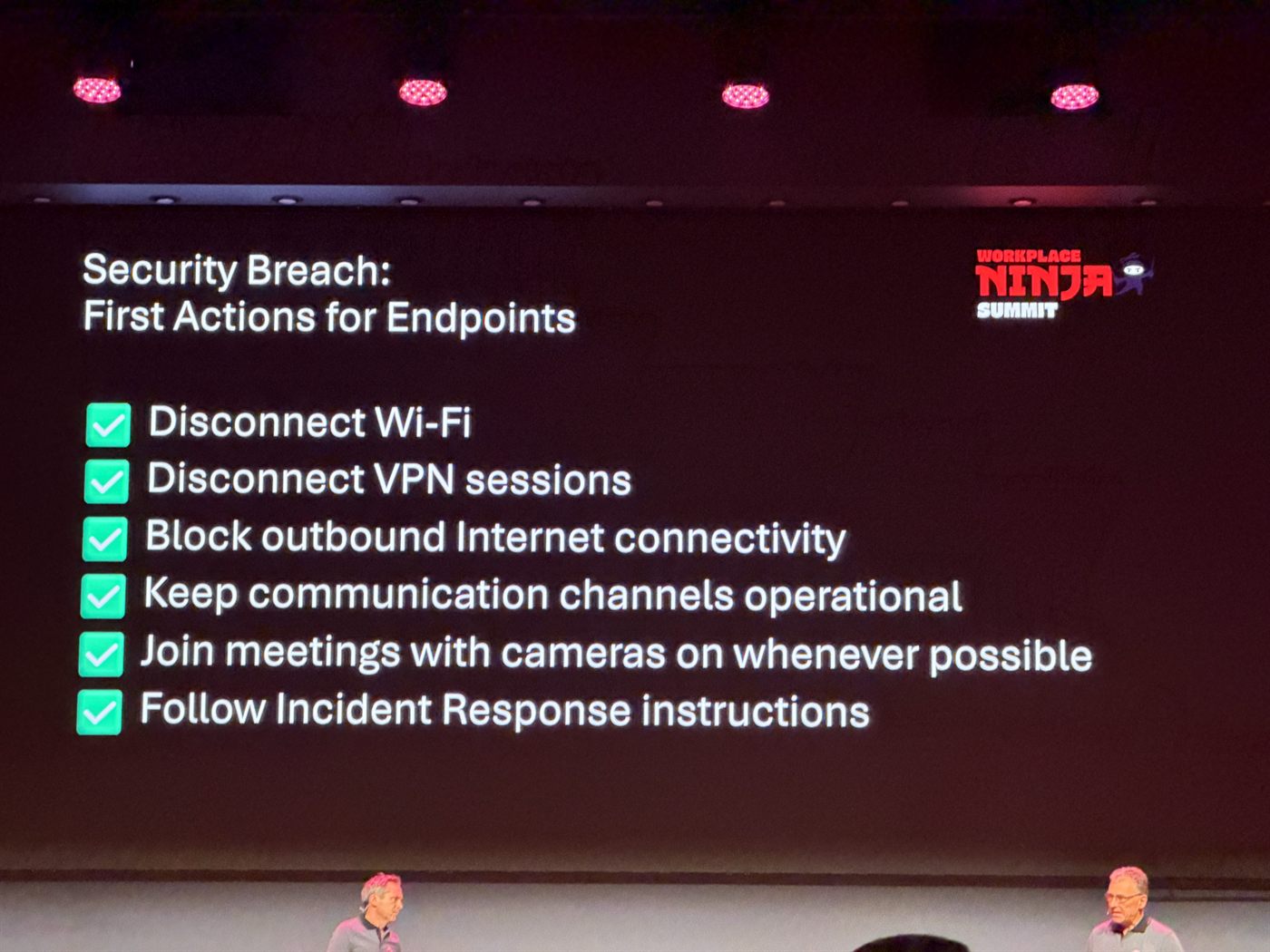
The do’s. “Join meetings with cameras on whenever possible” is the one nobody expects, and it is about verifying you are talking to your actual colleagues.
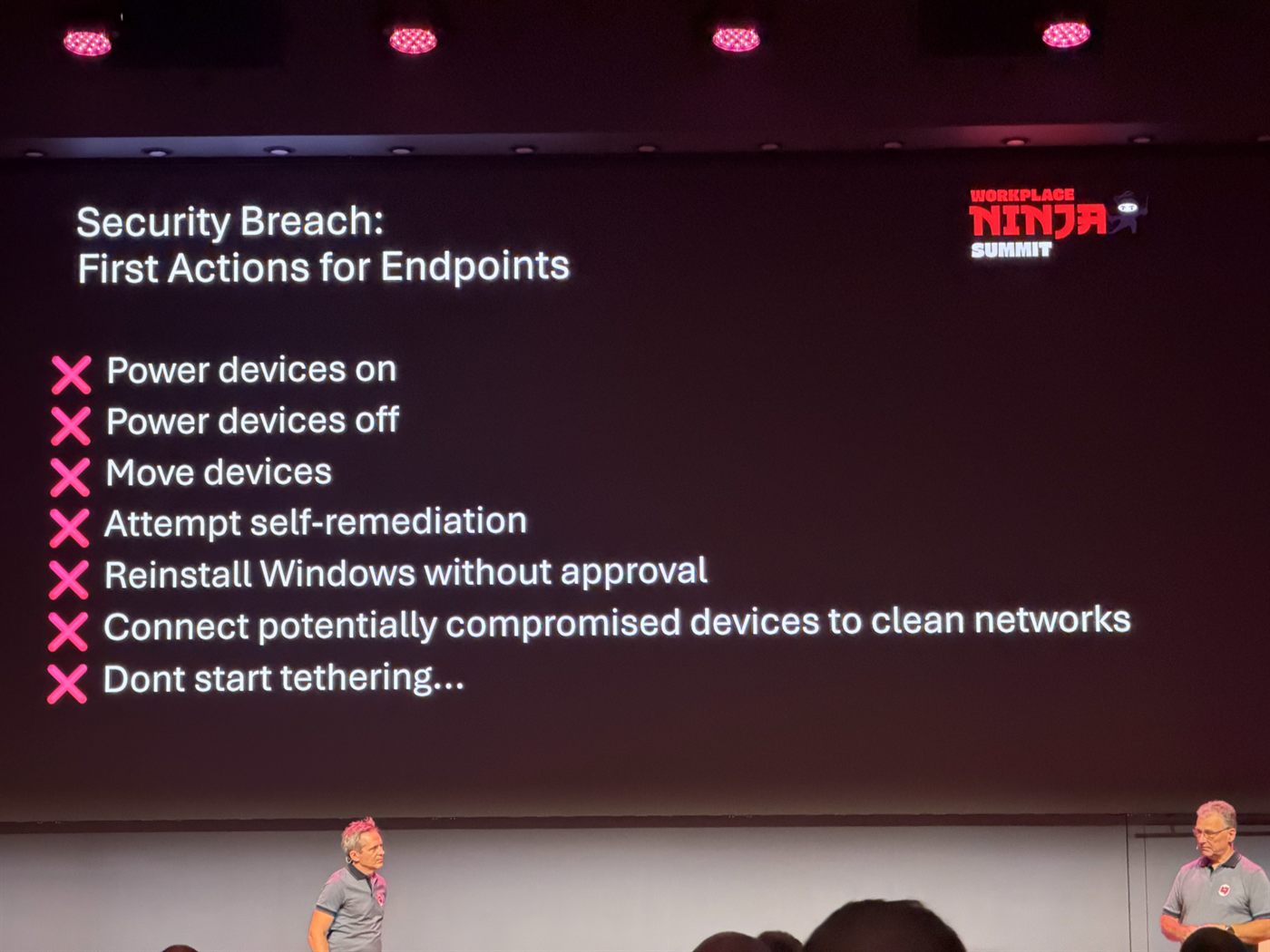
The don’ts, and note that both powering devices on and powering them off are on the list. Every instinct a good admin has during an incident is on this slide, and all of them destroy evidence.
Inside the Intune Management Extension: Why Applications Fail to Install
Rudy Ooms, Bryan Dam
Two people who have clearly spent too much time in these logs, which is exactly what you want. Bryan’s verdict on the IME logs: chef’s kiss.
Findings worth keeping:
- The manual app sync trigger,
intunemanagementextension://syncapp, now only syncs available apps. - dotPeek is the tool for looking inside the DLLs when you want to know what the IME actually does.
- IME release notes are tracked in the IME Change Tracker.
- Autopilot and device prep have a 256 app limit, which Rudy and Bryan tested rather than assumed.
Windows Autopilot Unlocked: Tips, Tricks, and Real-World Optimisation
Keeran Mistry, Rudy Ooms, Maurice Daly
- Scripts can run twice, depending on the assignment.
- Get-AutopilotDeviceAssociation for working out device to user associations.
- Speed comparisons between Autopilot, Autopilot with ESP and Autopilot v2 came out inconsistent, possibly because the CDN addresses used as the source vary between runs.
- Pre-provisioning remains the best option. The user reaches the desktop in no time.
- Update OneDrive during Autopilot for a better first-run experience.
- Disabling cmd in OOBE via a tag file is apparently not widely done. I need to check whether our remediation writes that tag file into the recovery environment.
- Skipping the user ESP (SkipUserESP) helps in more ways than I realized: required apps no longer wait out the 60 minute window, and Autopilot stops getting stuck on apps.
On the speed question they had actually done the work, and the result is the most honest benchmark slide I saw all week:
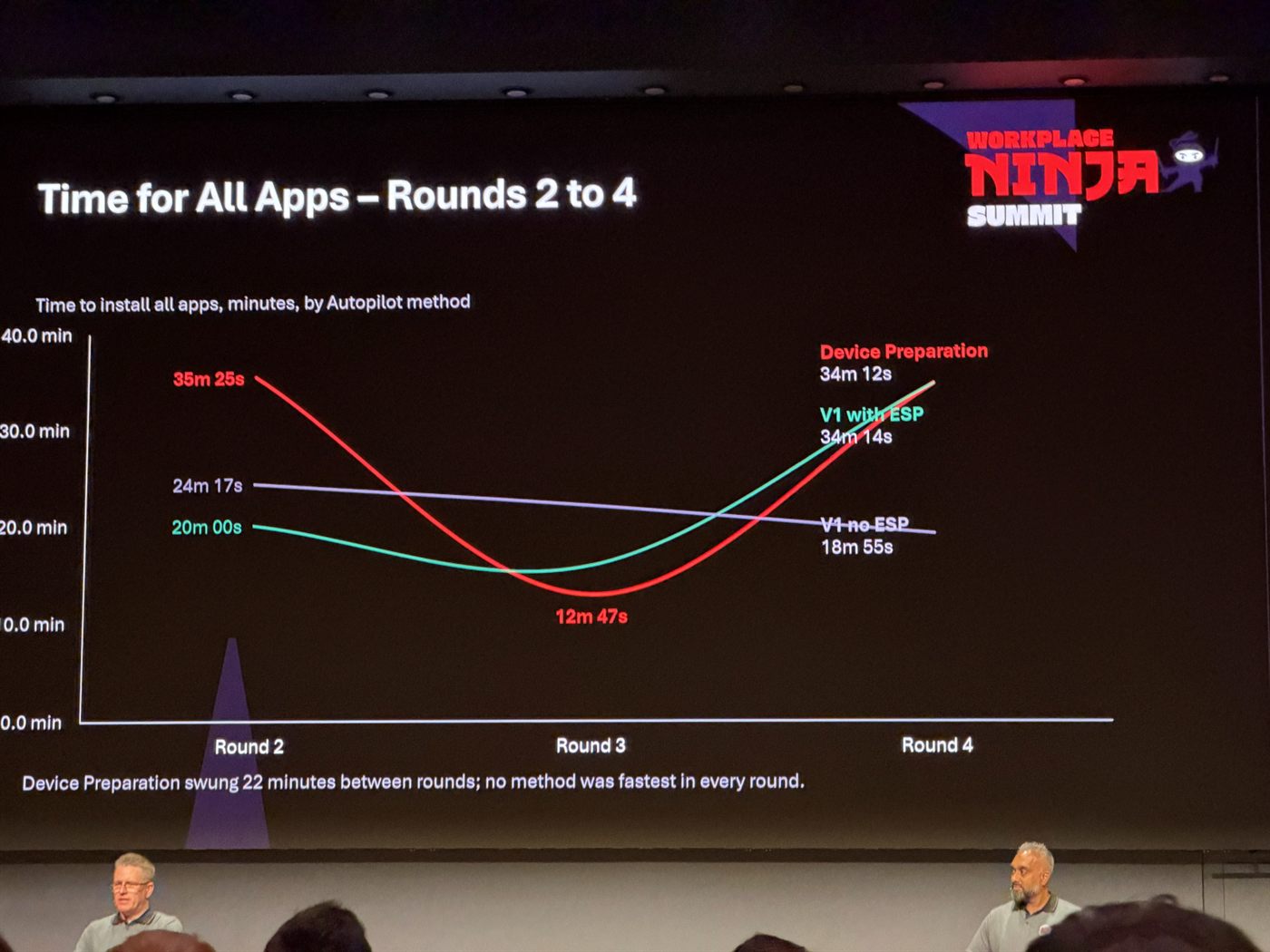
Device Preparation went from 35m25s in round two, down to 12m47s in round three, back up to 34m12s in round four. A 22 minute swing on the same method. No method was fastest in every round, which is the actual finding: if someone shows you a single Autopilot timing, it means nothing.
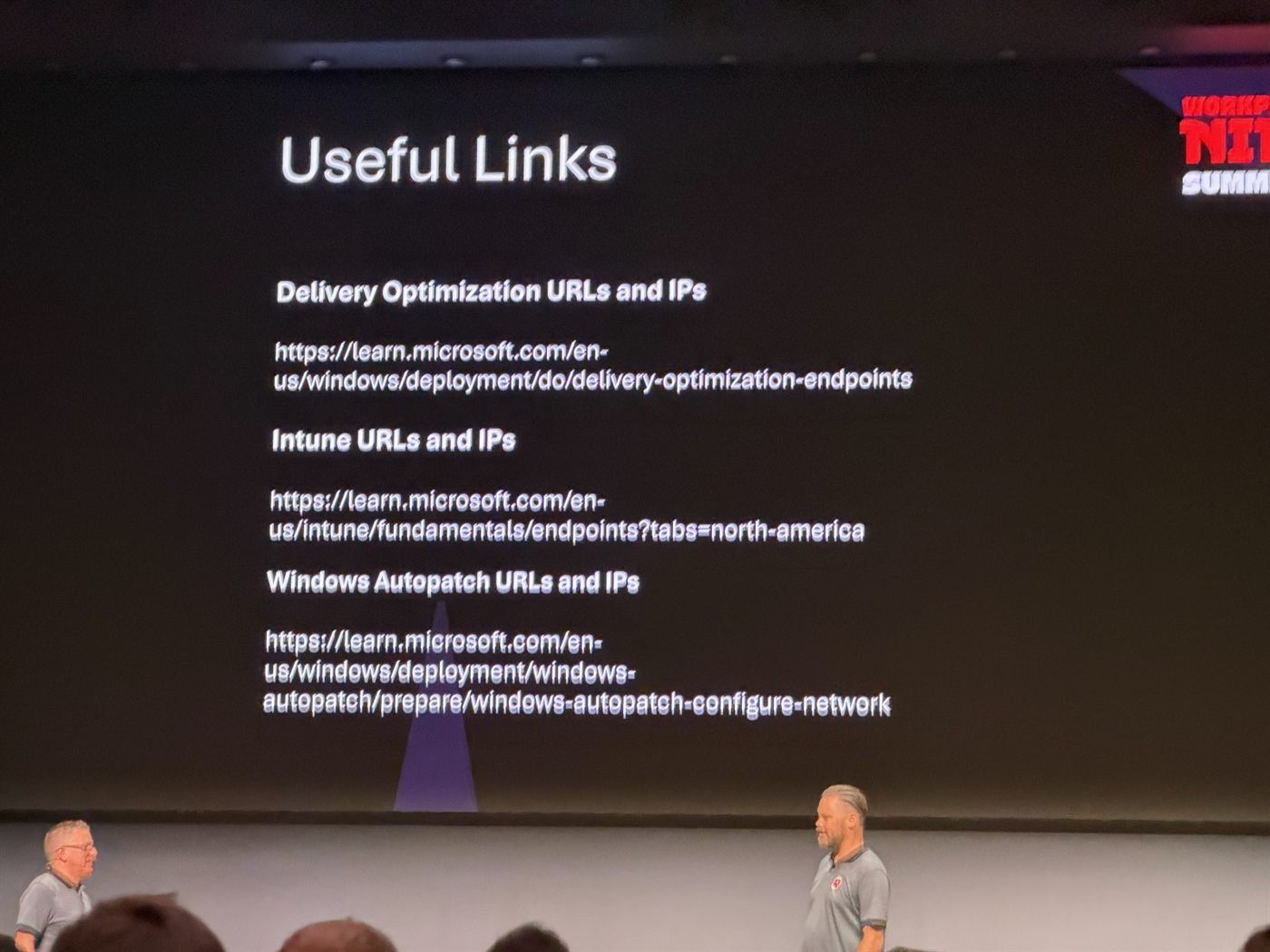
They also collected the endpoint URL and IP documentation in one place, which is worth bookmarking before your next firewall conversation:
Ninja Tips & Tricks, Beer Session
Peter Daalmans
The traditional closing session of day three, and reliably the densest hour of the week. Everything below is somebody else’s work, credited to them.
- ZeroAdmin uses EPM audit data to generate EPM rules. Mattias Melkersen
- Boot from a custom recovery image with OSDCloud inside it: part I and part II on danzi.blog
- “A reboot a day keeps the servicedesk away.” Sami Laiho
- Win+Shift+T for OCR with the Snipping Tool. Sami Laiho
- Microsoft winfile, with modern additions like right click to open bash or PowerShell. Sami Laiho
- ZoomIt DemoMirror from Sysinternals: Ctrl+9, plus Ctrl+Alt+9 for window-only mirroring and Ctrl+Shift+9 for a selectable area. Sami Laiho and Fabian Bader
- Intercom 2. After last year’s Intercom, Henrik came back with version two: it calls his phone when someone is at the door, lets visitors play a game on the touchscreen, and rather more. Taking bets on Intercom 3 next year. Henrik Söderström
- Keep the WinRE image as close to 1 GB as possible, and a script to expand and update it. Martin Himken
- MDM Migration Cockpit for Apple MDM migration, with source and destination policy analysis, migration scheduling and more. Somesh Pathak
- Force Windows updates during the technician phase of pre-provisioning. Somesh Pathak
- Surviving a required reboot inside pre-provisioning. Their script sets a BIOS password and BIOS settings, which needs a restart in between. The trick is to install in the technician phase without writing the detection key, save the state locally, and let the app run again during OOBE and continue from that saved state. Alberto Robledo
- Edge extension showing Lenovo warranty information directly in Intune, coming soon. Blog Marco Wohler
- License Meter surfaces cost saving potential across your SaaS apps and subscriptions. Ugur Koc
- Automating OS version compliance: keep the minimum version in MAM and compliance policies aligned with end-of-life dates automatically. Jeroen Burgerhout
- Packaging factory builds Intune packages with AI support. Currently for his customers, but ask him if you would like to test it. Akos Bakos
Day 4, Thursday
Unleashing the Power of Microsoft Intune Community Tools
Ronni Pedersen, Jörgen Nilsson
Jörgen opened with the question they ask first in every project: how do you deploy Windows, bare metal? Everything else follows from that answer, and it is a better opening question than anything on a maturity assessment form.
The tools I had not been using:
- Intune Settings Catalog Viewer for finding out what a settings catalog setting actually is before you ship it.
- EventLogExpert for reading Windows event logs like a human being.
- Get-IntuneManagementExtensionDiagnostics, Petri Paavola’s IME log analyzer. Given how much of day three was spent in those logs, this one goes straight into the toolkit.
- App Control Manager, available from the Microsoft Store, for building and managing App Control policies.
Mission: Intune-possible: What Really Runs on an Intune-Managed Windows Device
Mattias Melkersen, Rudy Ooms
A sequel in spirit to the IME session the day before, and the one that filled in the most gaps in my mental model.
- Policy payloads cap at 4 MB. Every script you add counts against it, and digital signing costs a surprising amount of that budget. The bigger the payload, the longer the sync takes, and past a point it simply does not complete.
- Watch out for Rudy’s RSoP tool, apparently landing within weeks. It is the thing everybody has wanted since the day we left Group Policy behind.
- Creating or changing a policy triggers a WNS push, so the device syncs immediately instead of waiting out its next cycle.
- The new IC3 channel holds a live standing connection for push from Intune to the client. It is not polling, and it is the same proven protocol that carries Teams availability state.
- PowerShell script intervals are hard coded to 8 hours. Not configurable, so stop trying.
- A single device query and a bulk device query take different paths, the IME versus the inventory agent. That explains a class of “it works for one device but not for the fleet” confusion.
The slide that made the architecture click was the breakdown of what the IME is actually responsible for:
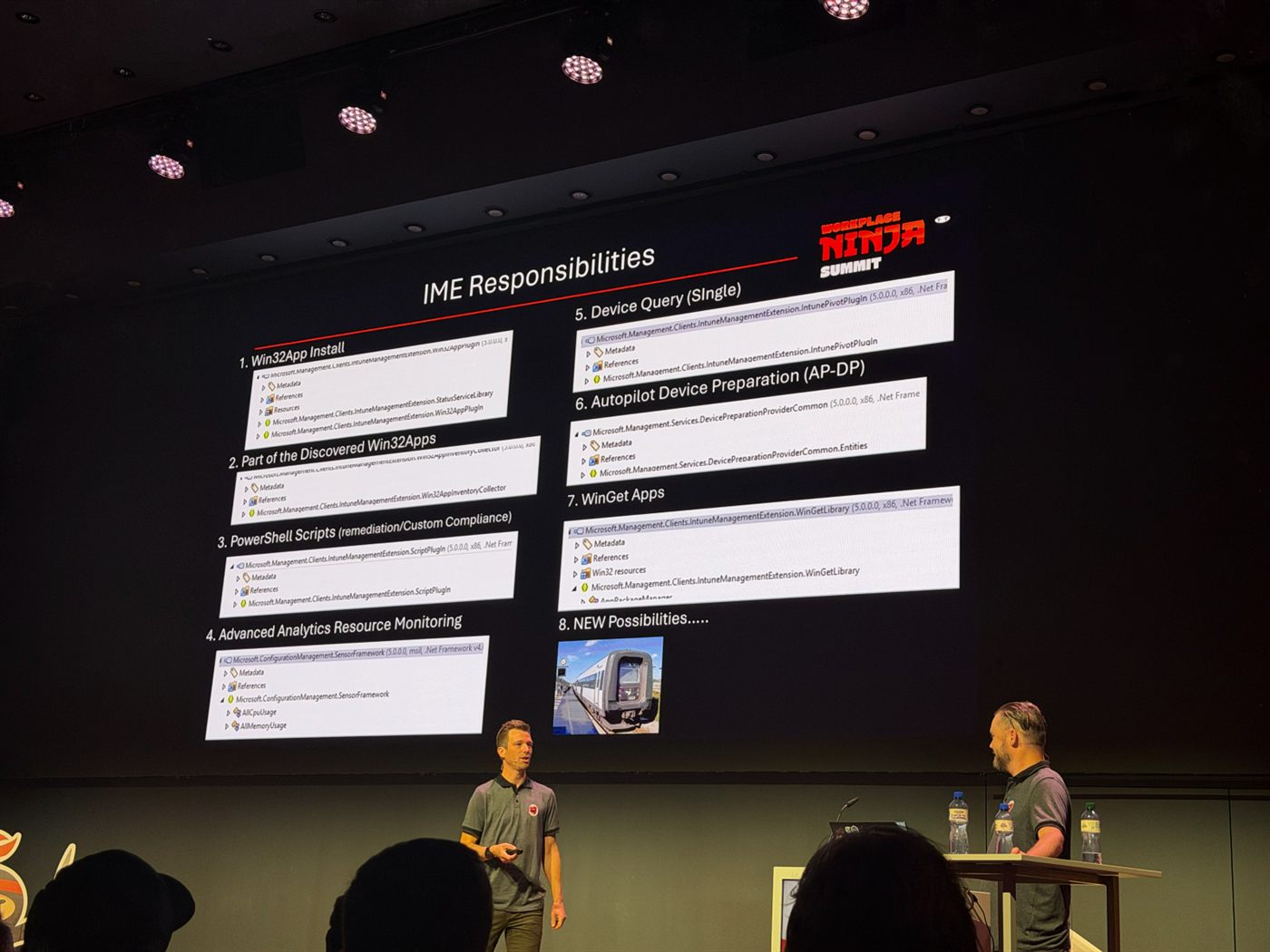
Eight jobs in one agent: Win32 app install, discovered apps inventory, PowerShell scripts for remediation and custom compliance, resource monitoring, single device query, Autopilot Device Preparation, WinGet apps, and item eight left open for whatever comes next. When people say “the IME is flaky”, this is the surface area they are talking about.
Secure Mobile: iOS and Android realities
Anya Novicheva
The densest roadmap session of the week, and the one I took the most photos in. The organizing idea is that Apple management is finishing a move that has been underway for years.
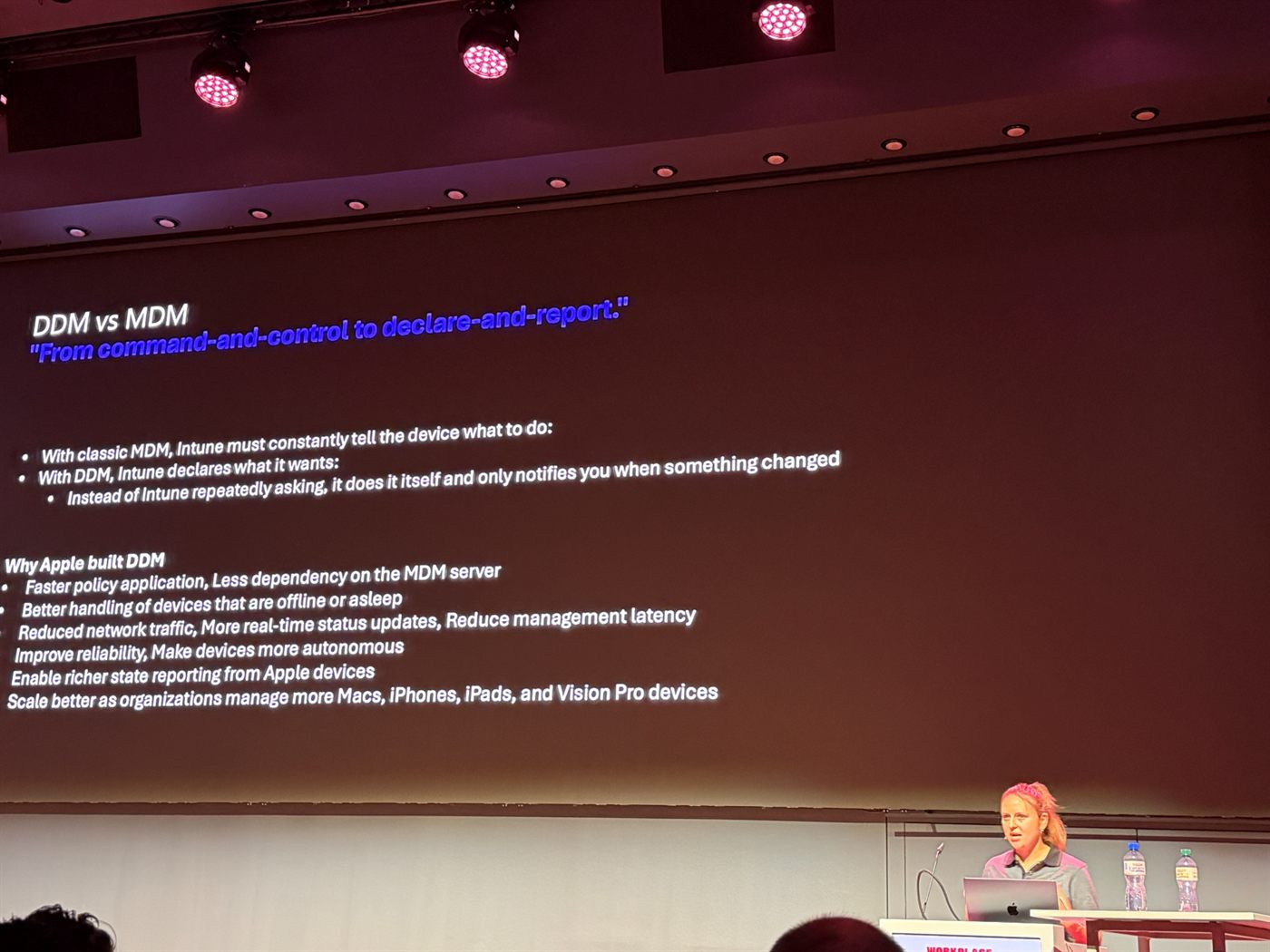
From command-and-control to declare-and-report. With classic MDM, Intune must keep telling the device what to do. With DDM, Intune declares what it wants, the device does it itself and reports back only when something changed.
On the Apple side:
- Allowed and denied binaries for macOS are in the settings catalog now, matched on CD hash, path prefix, signing ID or signing state.
- Enhanced log collection is available now for iOS and macOS as a device action. You paste in an AppleCare token and trigger a diagnostic log collection session through DDM, instead of coordinating it with whoever is holding the device.
- Device inventory arrives in October as the data-driven replacement for the Hardware blade, built like the settings catalog so new attributes are easy to add. App inventory replaces discovered apps and its 7 day refresh; Windows is already GA, macOS comes sooner and Apple mobile lands early next year.
- Unlimited licenses for VPP assets are coming soon, which means no more 9610 errors. DDM apps with required VPP is already GA.
- Migrating Apple enrollment profiles to enrollment policies is the change I had already been through, and I wrote it up in two parts: the migration itself and automating it.
- ACME replaces SCEP for Apple enrollment certificates. It is more robust, and more importantly it sets the foundation for managed device attestation. It applied only to newly enrolled devices, and Microsoft plans to migrate existing SCEP deployments so that attestation does not require re-enrolling the fleet.
- iOS web enrollment is GA: the Company Portal is no longer required for Conditional Access flows, and the guided enrollment experience lives inside the M365 apps.
- Releasing devices from Apple Business Manager via Graph with no ABM login, through releaseAppleDevices, up to 100 at a time.
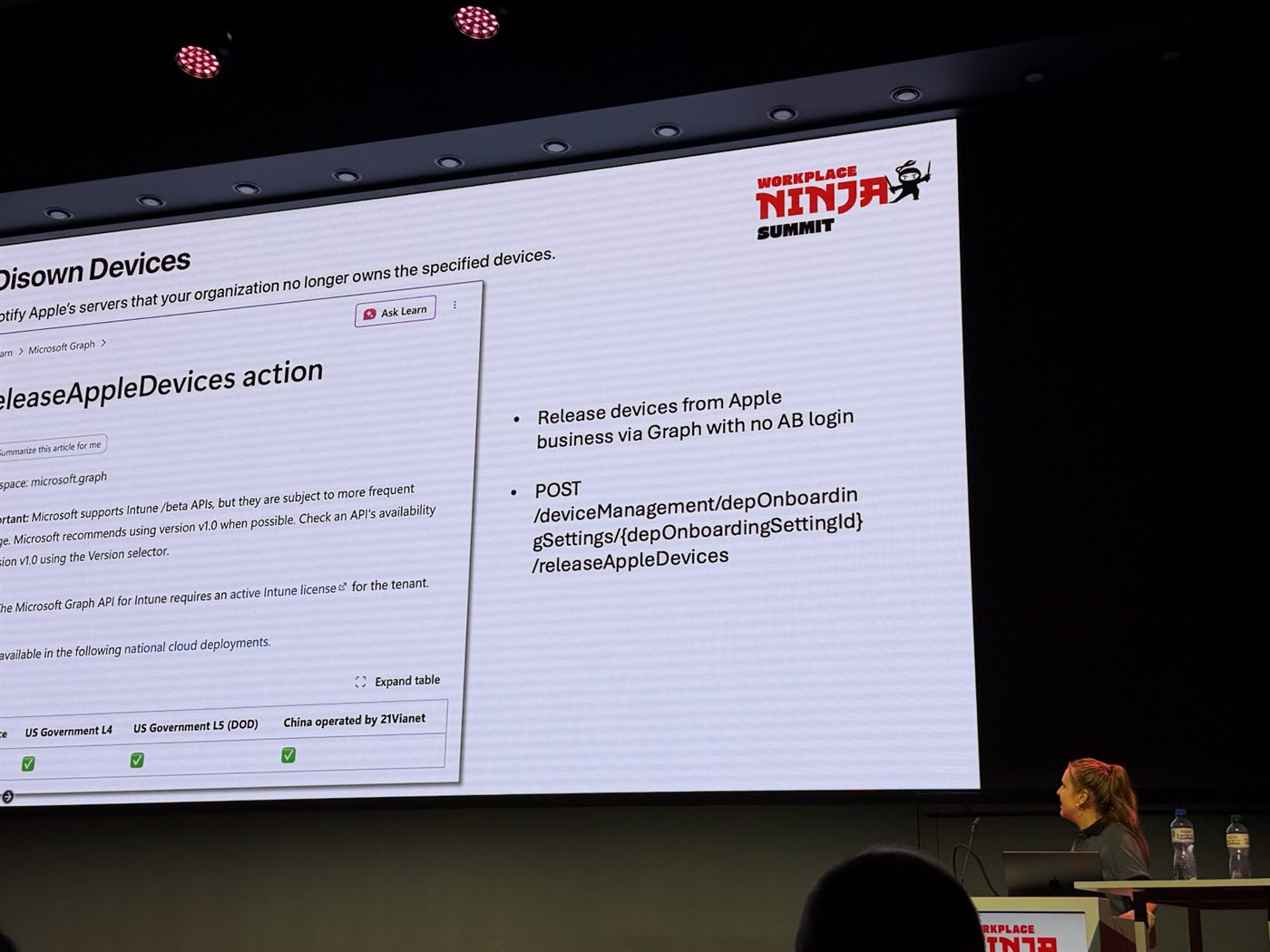
Disowning devices from Apple Business Manager without logging into Apple Business Manager. If you have ever offboarded a batch of iPads by hand, this is the slide.
On the Android side:
- Filter app assignments by device management type, released January 2026, for MDM enrolled devices and MAM managed apps. Settings catalog support is promised by Q4 CY26.
- eSIM support for COBU, COSU and COPE goes GA this autumn, with eSIM properties visible in the new inventory and bulk or per device activation.
- Managing AI on Android got its own framework, which is the first time I have seen this laid out as an actual management surface rather than a worry.
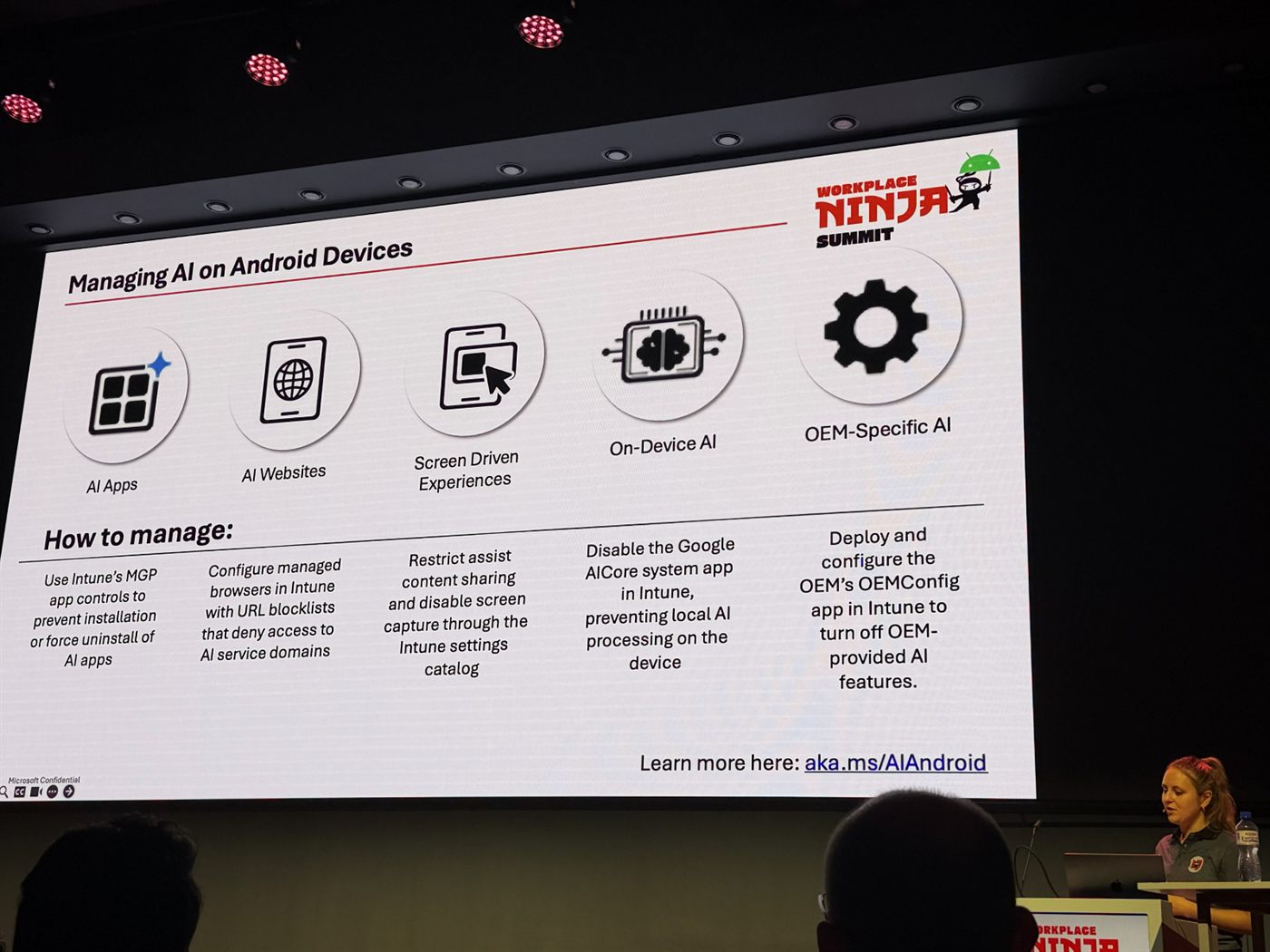
Five categories, five different levers: MGP app controls for AI apps, managed browser URL blocklists for AI websites, the settings catalog to restrict assist content sharing and screen capture, disabling the Google AICore system app to stop local processing, and the OEM’s own OEMConfig app for OEM AI features. Details at aka.ms/AIAndroid.
Where all of this is heading was on one slide, and it was not subtle:
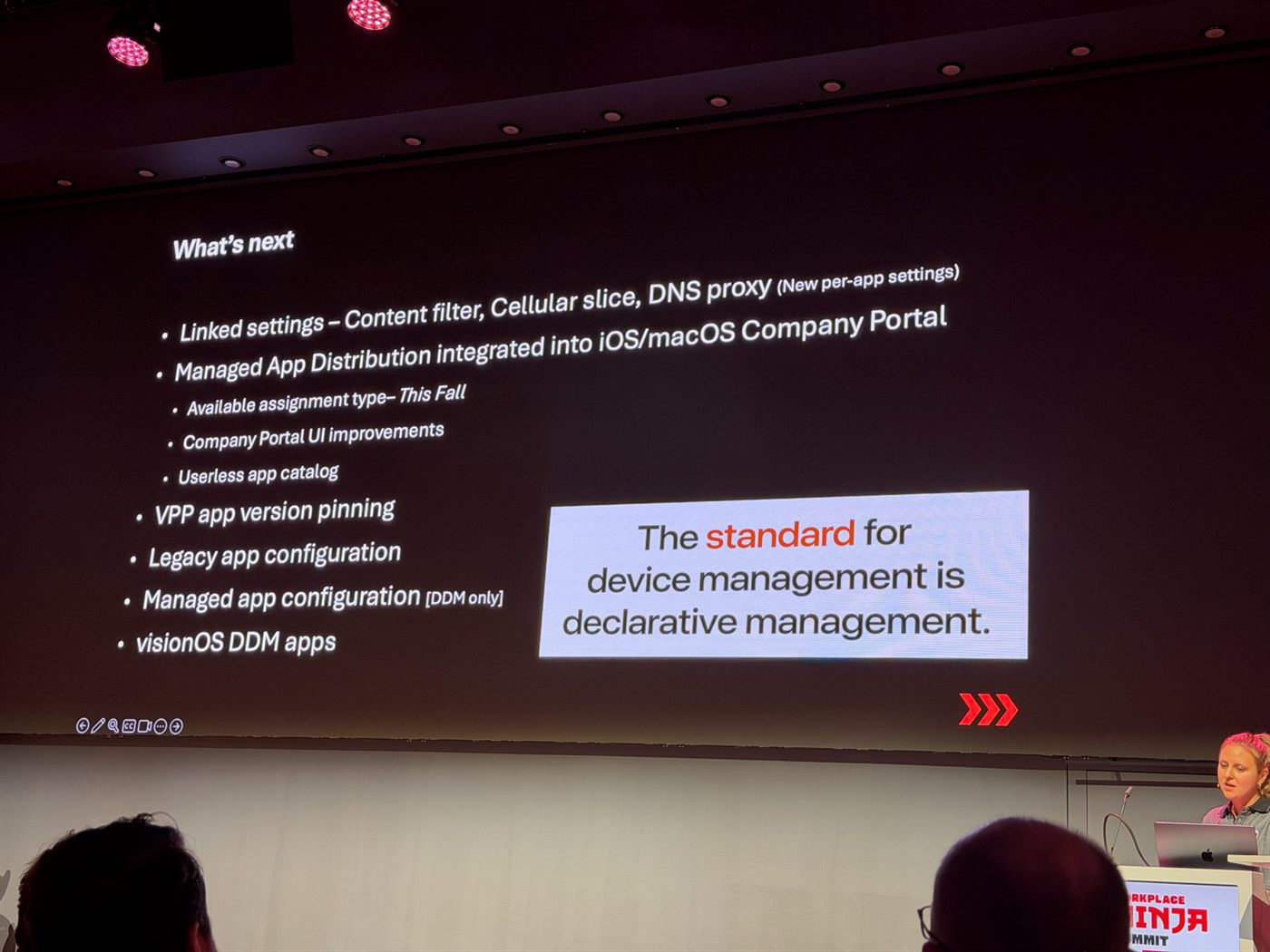
“The standard for device management is declarative management.” If you still think of DDM as the new thing Apple is experimenting with, that framing is now a year or two out of date.
Implementing PAW without making everyone hate you
Eric Woodruff
The “without making everyone hate you” part of the title is doing a lot of work, and the session earned it. Eric asked who in the room was running privileged access workstations and got the same few hands the question always gets.
- The Microsoft documentation is dated. He said it plainly, which was a relief to hear from someone who clearly wants people to do this.
- A different browser, or a VDI session reached from the normal workstation, is a tier breach, because it is lower privilege reaching into higher privilege. In Eric’s view a shared hypervisor is one too. The convenient shortcuts are exactly the ones that undo the separation you built.
- PAW as host with a guest Hyper-V VM for production is unreliable. The hardened host network makes the productivity VM’s connections harder than they need to be, guest wifi hotspot pages being the obvious casualty. A travel router works around it. The better arrangement is PAW as the host with Windows 365 as the production device, and he is currently exploring Windows 365 Link to put the PAW itself into W365.
- Moving files between production and the PAW without breaking tiering: OneDrive on the web from the PAW, opening a link shared from the production device. Or a VS Code tunnel, signing in to VS Code on the PAW as an unprivileged user and connecting to it from the production device.
- Screen sharing by joining the Teams meeting with the meeting ID and password in Edge.
- A red tenant with Tenant Governance through GDAP and user sync, because not every admin workload works with guest accounts. SharePoint Online and the Admin Center are the ones that bite.
The point that stayed with me is that PAW fails in practice not because the controls are hard but because every workaround people invent to make their day tolerable is also a tier breach. Hence the title.
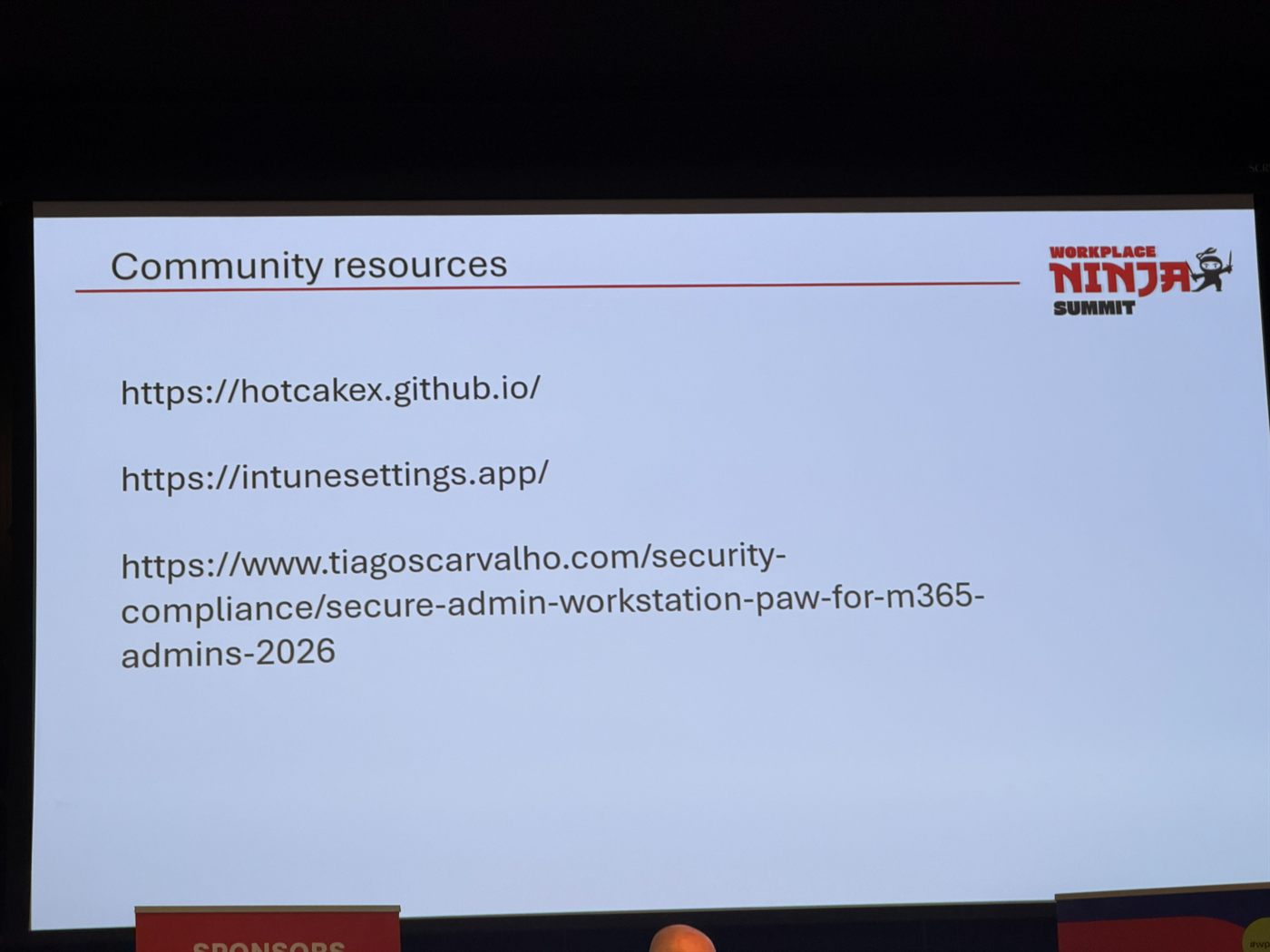
His resources slide, transcribed: hotcakex.github.io, intunesettings.app and Secure Admin Workstation (PAW) for M365 Admins 2026.
What I am taking back to the office
Five things are already on my list.
The ASU question goes into our troubleshooting runbook. It costs nothing to check and it cleanly separates “our problem” from “not our problem”.
The ASR default exclusions need auditing. We enabled those rules and assumed they meant what they say. Finding out that a binary already present before enablement gets a pass is exactly the kind of gap that only shows up when someone is already inside.
The SkipUserESP change is going into our next Autopilot iteration. The 60 minute required app wait alone justifies it.
The Apple certificate move needs a plan rather than a surprise. ACME replacing SCEP is the kind of change that is trivial if you schedule it and painful if you discover it, and the attestation story on the other side is worth the effort.
And I need to check whether our remediation actually writes the OOBE tag file into the recovery environment. We have the remediation, but I have never confirmed it survives into WinRE, which is precisely where it would matter.
Four days, and the pattern I did not expect: almost every session that stayed with me was about something being less trustworthy than its label suggests. ASR rules with undocumented exclusions, backups that work 40% of the time, Autopilot timings that swing 22 minutes between identical runs, PAW deployments undone by the workarounds people invent to survive them. The tooling is genuinely getting better. The habit worth taking home is checking what it actually does rather than what it says it does.
Whatever else the summit does, it reliably sends me home with more GitHub tabs open than I arrived with.